Artvizual · QR Code Education
How QR Codes Work: A Complete Beginner's Guide
Learn exactly how QR codes store information, how smartphones read them, and why millions of businesses use QR technology every day.
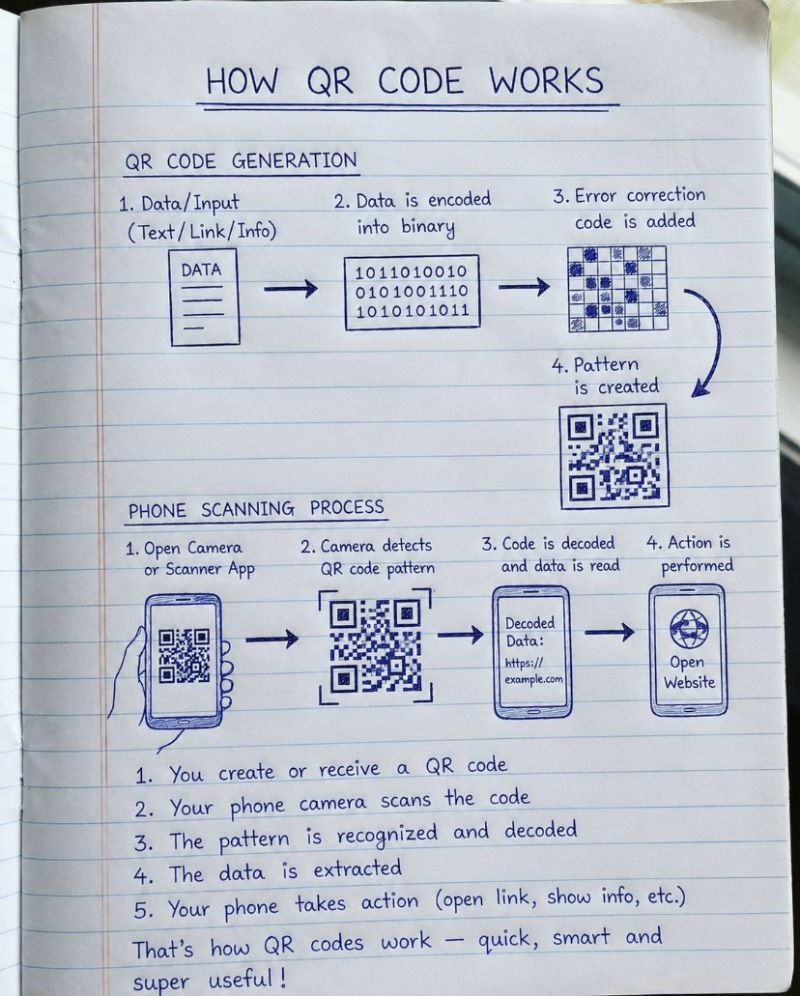
What is a QR Code?
A QR code — short for "Quick Response" code — is a two-dimensional barcode that stores information inside a grid of black and white squares, called modules. Unlike a traditional barcode, which only reads left to right, a QR code reads in two directions at once, which is what lets it hold far more information in the same amount of space.
A single QR code can store a website link, a block of plain text, Wi-Fi login details, a contact card, payment information, or almost any short string of data. Once that data is encoded into the pattern, any smartphone camera or dedicated scanner can read it back in a fraction of a second, without needing a special app in most cases, since QR scanning is now built directly into the native camera on iOS and Android.
What makes QR codes genuinely useful for business is not the pattern itself, but what it triggers. Scanning a code can open a menu, start a phone call, add a contact, join a Wi-Fi network, launch a payment, or redirect to a marketing page — all from a single glance at a printed square. That combination of simplicity, low cost, and instant action is why QR codes have become a permanent fixture in restaurants, packaging, events, and print advertising.
How QR Codes Are Generated
Every QR code goes through the same four-stage build process before it becomes a scannable pattern, whether it's carrying a single sentence or a full web address.
Data input
The process starts with the raw information you want the code to carry — a URL, a piece of text, contact details, or a Wi-Fi password. This is the only part of the process a human ever types in directly.
Binary encoding
That data is converted into binary — a long string of 1s and 0s. The QR code standard picks the most efficient encoding mode automatically, depending on whether the data is numeric, alphanumeric, plain text, or raw bytes, to keep the resulting pattern as compact as possible.
Error correction is added
Before the pattern is drawn, the code adds redundant data using a method called Reed-Solomon error correction. This is what allows a QR code to remain scannable even when part of it is scratched, smudged, or covered by a logo.
Pattern is created
Finally, the binary data — now padded with error correction — is arranged into the finished grid of black and white modules, along with the three large finder squares in the corners that let a camera locate and orient the code instantly.
How Your Phone Reads a QR Code
Scanning reverses the generation process, and it happens almost instantly — usually in well under a second once the camera has a clear view of the code.
Camera detects finder patterns
The camera looks for the three large squares in the corners of the code. These finder patterns tell it exactly where the code is, and at what angle, even if the code is tilted, rotated, or photographed from an angle.
QR code is decoded
Once the grid is located, the camera reads each module as a 1 or a 0, reconstructing the original binary string exactly as it was encoded during generation.
Error correction repairs damaged data
If part of the pattern is unreadable — because of dirt, glare, a crease, or a decorative logo in the middle — the built-in error correction fills in the missing pieces using the redundant data added at generation time.
The stored information is extracted
The corrected binary is translated back into readable data: a link, a block of text, a phone number, or whatever the code was built to carry.
The requested action is performed
Your phone finishes the job — opening a website, starting a call, joining a network, or showing a text preview — based on the type of data that was decoded.
Static vs Dynamic QR Codes
Not all QR codes work the same way behind the scenes. The difference between static and dynamic QR codes has nothing to do with how they look — it's about whether the data inside can ever be changed.
| Static QR Code | Dynamic QR Code | |
|---|---|---|
| Data storage | Information is encoded directly into the pattern | Pattern points to a short redirect URL on a server |
| Editable after printing | No — permanent once generated | Yes — destination and content can be updated anytime |
| Works offline | Yes, for text-based data | No — requires an internet connection to redirect |
| Scan tracking | Not possible | Yes — scan counts, location, and timing can be tracked |
| Best for | Wi-Fi passwords, fixed text, one-time print runs | Campaigns, menus, coupons, anything that changes over time |
Because a dynamic QR code can be edited after it's already printed on packaging, posters, or menus, it's the far more practical choice for most business use. If a promotion ends, a menu item changes, or a link moves, the destination behind a dynamic code can be updated instantly — without reprinting a single sign. It also opens the door to genuine performance data: scan counts, timing, and device type, none of which a static code can offer.
Artvizual builds both static and dynamic QR code generators, along with fully designed, on-brand QR codes rather than generic black-and-white squares. If you're setting up a code for a campaign, a menu, or packaging, Artvizual's QR code tools handle the technical side so the code just works, however it's designed.
Creative QR Codes
A QR code doesn't have to look like a plain black-and-white grid. As long as the finder patterns stay readable and enough contrast is preserved, a code can carry a logo, custom colors, rounded modules, or a full illustration woven around it — while still scanning perfectly.
That flexibility is what turns a purely functional barcode into a piece of branded design that people actually want to look at, photograph, and scan. Creative QR codes show up naturally across:
A restaurant can wrap its code in the texture of a dish, a musician can build one around an album cover, and a retail brand can turn a discount code into something worth sharing on social media in its own right. The technology underneath never changes — only the design layer around it does.
Animated QR Codes: Bring Your QR Codes to Life
An animated QR code adds motion to the design around the scannable pattern — a looping logo reveal, a shifting gradient, or a short motion sequence — so the code catches the eye before anyone even reaches for their phone. In a busy environment, from a shop window to a crowded feed, movement is simply more noticeable than a static square, which is why animated codes tend to draw more attention and more scans than plain ones.
Animated QR codes show up well across a wide range of formats, including:
The benefits compound: higher engagement from the extra visual interest, more scans simply because more people notice the code in the first place, stronger brand recognition when the motion echoes a logo or product, better conversion rates once someone does scan and land on a well-designed destination, and marketing that stands out in a feed or storefront full of static graphics.
Artvizual designs custom animated QR codes for businesses, creators, and brands that want their code to do more than sit quietly on a poster. A few examples of what that looks like in practice:
Restaurant Animated QR Code
A menu code with a subtle steam or shimmer loop, placed on table tents and takeout packaging.
Music Album QR Code
Cover art that pulses gently, linking straight through to a new single or streaming release.
Event QR Invitation
A countdown-style animation on printed invites, driving RSVPs and ticket sales.
Product Launch QR
A reveal animation timed to a launch date, built into packaging or shelf displays.
Social Media QR Campaign
A motion-graphic code designed to be screenshotted, shared, and scanned straight from a feed.
Frequently Asked Questions
How do QR codes work?
A QR code stores data as a grid of black and white squares. Your phone's camera detects three corner squares to orient the code, reads the pattern, corrects for any damage using built-in error correction, then converts the pattern back into the original text, link, or information and performs an action.
Can QR codes expire?
Static QR codes never expire because the data is fixed permanently in the pattern. Dynamic QR codes can expire, since they redirect to a URL stored on a server, and that redirect can be turned off, changed, or set to lapse on a chosen date.
Are QR codes safe?
QR codes themselves are just a data format and carry no inherent risk. Safety depends on where the code leads. It's good practice to check the preview link your phone shows before opening it, and only scan codes from sources you trust.
How much data can a QR code store?
A standard QR code can hold up to roughly 4,296 alphanumeric characters or about 3 kilobytes of binary data, depending on the version and error correction level used. Most marketing QR codes use only a small fraction of this capacity.
What happens when you scan a QR code?
Your camera locates the finder patterns, measures the grid, and reads each module as a 1 or 0. The decoded binary is translated back into readable data, and your phone then opens a link, displays text, or triggers whatever action the code was built for.
Can QR codes work offline?
Yes. A static QR code that stores plain text, Wi-Fi credentials, or contact details works with no internet connection at all, since the information is embedded directly in the pattern rather than fetched from a server.
Why do QR codes have three squares?
The three large squares in the corners are finder patterns. They let a camera detect the code's position and orientation instantly, from almost any angle, so the code can be scanned even when it's tilted, rotated, or viewed at a distance.
What is QR code error correction?
Error correction adds redundant data to a QR code using Reed-Solomon codes, so the pattern can still be read correctly even if part of it is dirty, torn, or covered by a logo. Correction levels range from about 7% to 30% recoverable damage.
Can a damaged QR code still scan?
Often, yes. Thanks to built-in error correction, a QR code can lose a meaningful portion of its pattern to scratches, smudges, or a decorative overlay and still decode correctly, as long as the damage stays within the code's correction threshold.
What's the difference between static and dynamic QR codes?
A static QR code has its data locked in permanently and can never be edited. A dynamic QR code points to a short redirect URL, so the destination, content, and design can be updated at any time without reprinting the code.
Try Free QR Code Tools
Once you understand how QR codes work, the fastest way to put that to use is with a generator built for the job at hand.
Countdown QR Generator
A dynamic code that displays a live countdown to a launch, sale, or event before redirecting.
Try the Countdown GeneratorQR Coupon Generator
Turn a scan into a redeemable discount, built for restaurants, retail, and print promotions.
Try the Coupon GeneratorDynamic QR Generator
Create a code you can edit after printing — update the destination anytime, no reprint needed.
Try the Dynamic Generator